
New Page
Scenario
Target: NovaTech
Assessment Type: Grey Box assessment focused on their AI infratructure
Access: Network access to a segment hosting several AI-facing services
System
- A public-facing customer assistant with HTTP API access
- An internal GitLab instance hosting AI project repositories
- Two knowledge base endpoints backed by RAG pipelines
- A SIEM server collecting AI interaction logs
Attack Surface
Not monolithic, consisting of multiple layers.
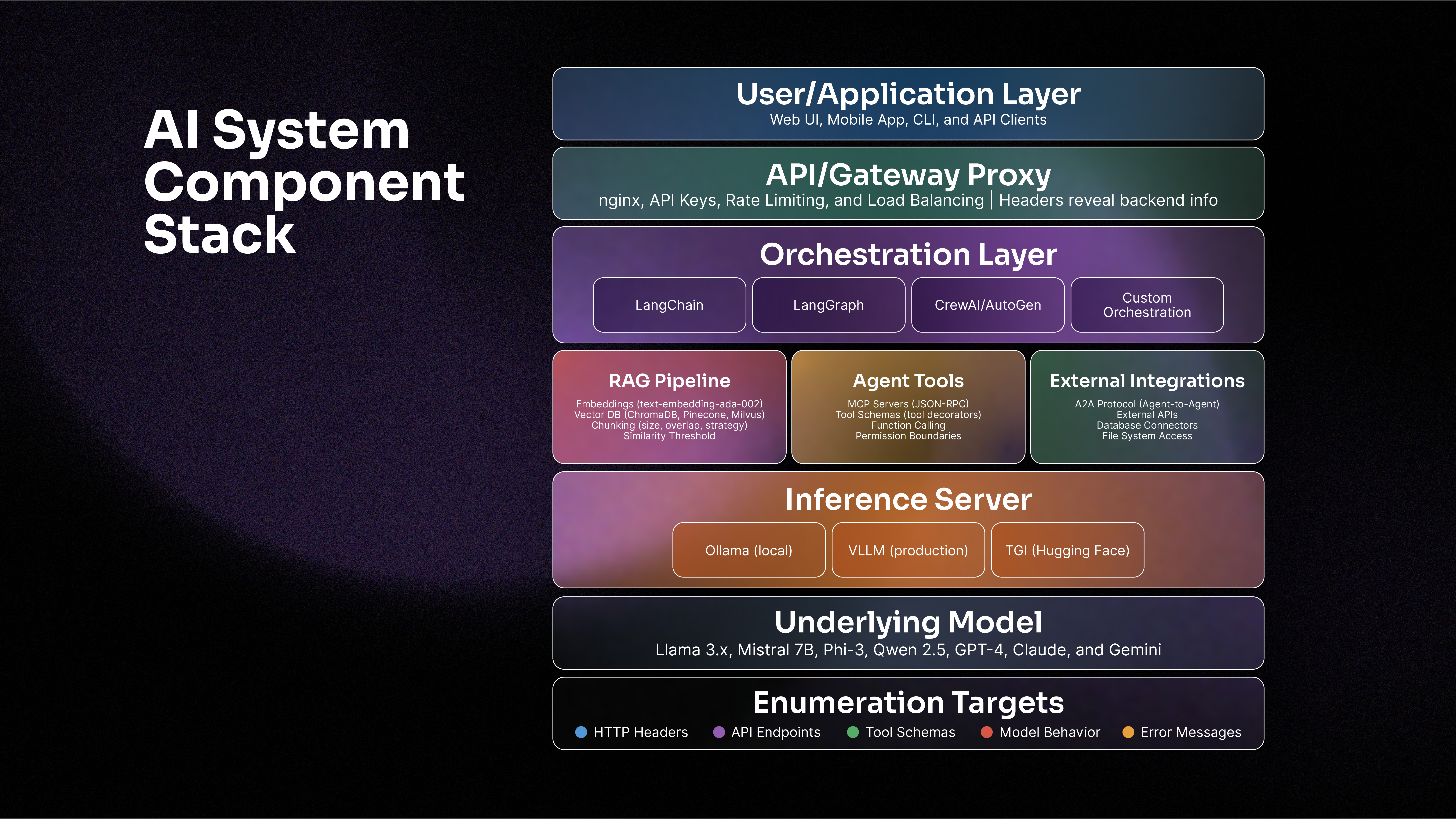
The Orchestration Layer coordinates how requests flow through the system. Frameworks like LangChain, LangGraph, CrewAI, and AutoGen manage prompt construction, context windows, and multi-step reasoning. Each framework has characteristic behaviors and error messages that can be fingerprinted through interaction. In practice, these frameworks often embed the components shown in the diagram. RAG logic, tool definitions, and inference client calls are typically integrated within the orchestration code rather than existing as separate services.
RAG: Fetch relevant context from vector databases before sending prompts to the model. While often implemented within orchestration frameworks, RAG functionality has distinct enumerable parameters.
Agent Tools: Expose capabilities through protocols like Model Context Protocol (MCP) (more about MCP) and includes permission boundaries that can be tested.
External Integration: Connect the AI to databases, file systems, and other agents via protocols like Google's Agent-to-Agent.
Inference server: Host the actual model and handles tokenization, generation, and response formatting. Such as Ollama, vLLM, TGI.
Reconnaissance Methods
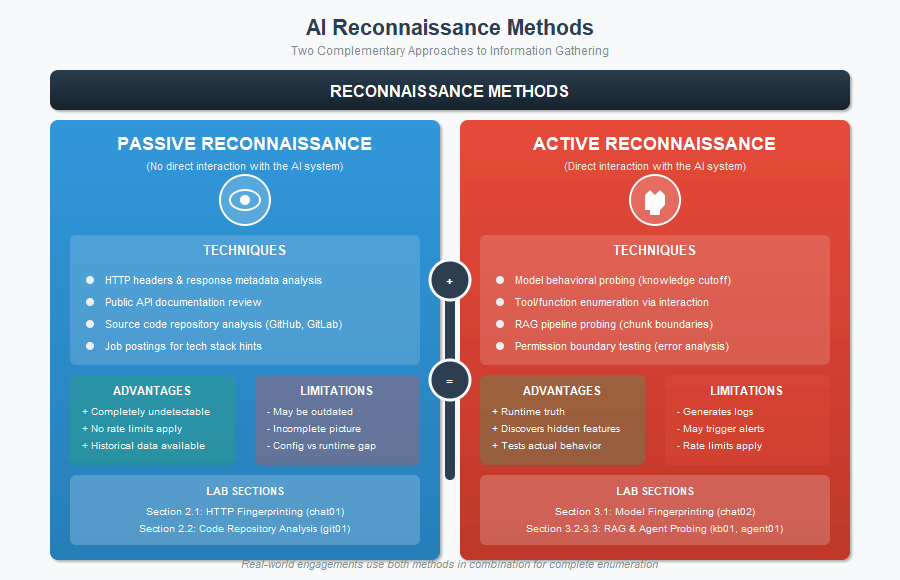
Passive:
- Analyze HTTP headers
- Review public API documentation
- Exam source code repo
- Mine job posts for tech stack hints
- More+
Active:
- Probe model knowledge cutoffs
- Tool enumeration
- RAG pipeline analysis via Chunk boundary detection
- Permission testing
- More+
Model Layer:
- Information: Model identity (vendor, family, version), capability boundaries (context window, supported languages), training data characteristics (knowledge cutoff, domain expertise), and behavioral constraints (content policies, safety filters).
- Method: Knowledge probing, capability testing, and response pattern analysis.
RAG:
- Information: Embedding model identity, vector database type, chunking parameters (size, overlap, strategy), retrieval thresholds, and document sources
- Method: Chunk boundary probing, embedding similarity analysis, and source citation extraction.
Agent:
- Information: Available tools and their schemas, permission boundaries, orchestration logic, and error handling behavior
- Method: MCP schema extraction, tool invocation testing, and permission boundary probing
Infrastructure:
- Information: traditional web application information plus AI-specific details: API endpoints, rate limits, error message formats, and backend service identities.
- Method: HTTP header analysis, error message mining, and endpoint enumeration
Passive Reconnaissance
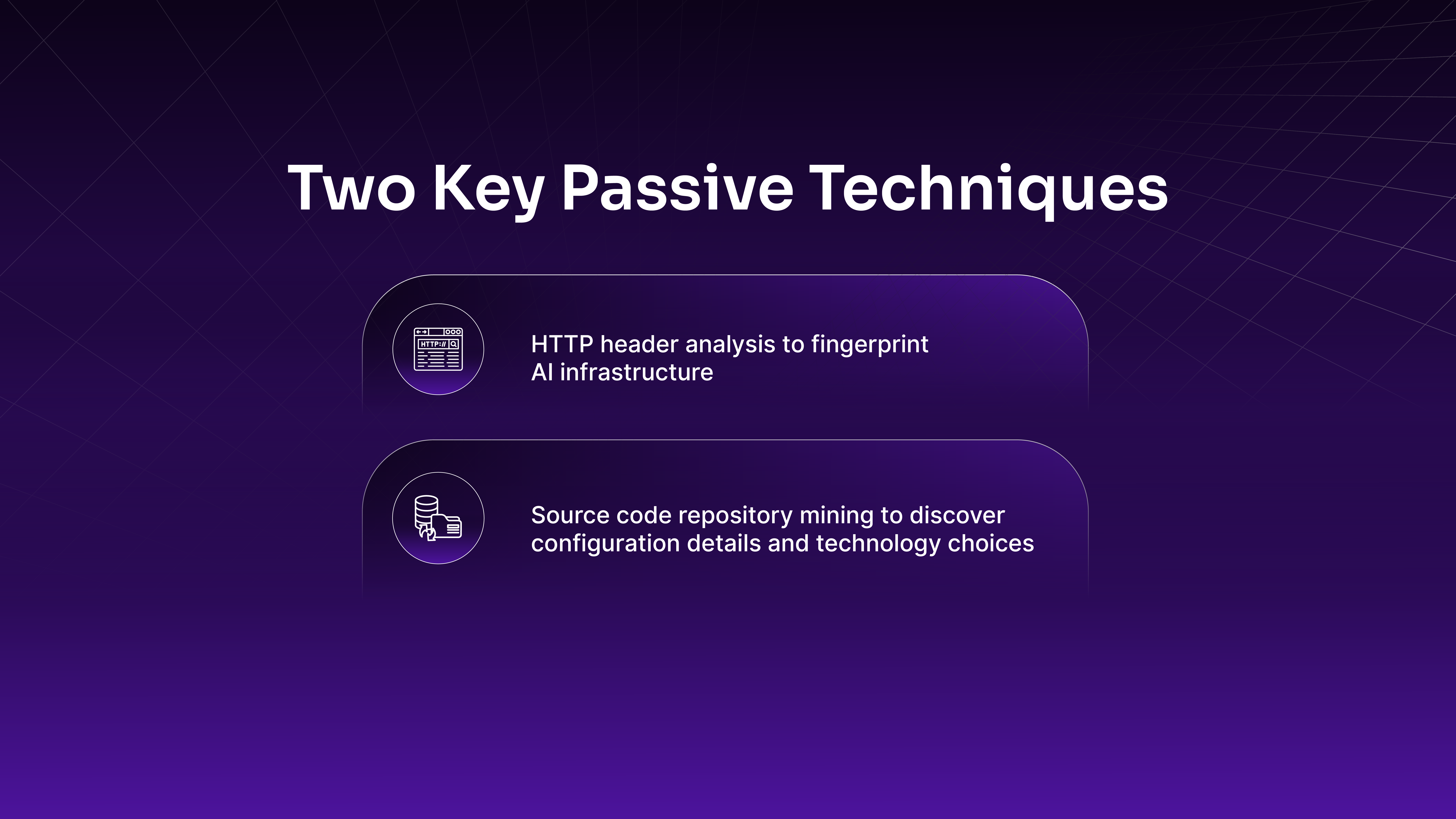
HTTP Header
offsec@kali:~$ curl -s -I http://192.168.50.21/
HTTP/1.1 200 OK
Server: nginx/1.24.0 (Ubuntu)
...
X-Powered-By: NovaTech/2.1.0
X-AI-Backend: OpenAI-GPT5.2
X-RAG-Provider: ChromaDB
X-AI-Backend: OpenAI's GPT-5.2 model
X-RAG-Provider: ChromaDB as the vector DB for RAG functionality
API endpoint
Common paths like /api/health, /api/status, etc.
offsec@kali:~$ curl -s http://192.168.50.21/api/health | jq
{
  "mcp_enabled": true,
  "model": "gpt-5.2-turbo",
  "rag_enabled": false,
  "service": "novatech-customer-assistant",
  "status": "healthy",
...
  "version": "2.1.0"
}
offsec@kali:~$ curl -s -X POST http://192.168.50.21/v1/chat/completions \
-H "Content-Type: application/json" \
-d '{"messages":[{"role":"user","content":"Hello"}]}' | jq
{
"choices": [
{
"finish_reason": "stop",
"index": 0,
"message": {
"content": "Thank you for your inquiry. I'm the NovaTech Customer Assistant. This is a demonstration environment - the AI service is currently in maintenance mode. Please try again later or contact support.",
"role": "assistant"
}
}
],
"created": 1771625450,
...
"model": "gpt-5.2-turbo",
"object": "chat.completion",
"rag_sources": null,
"usage": {
"completion_tokens": 50,
"prompt_tokens": 297,
"total_tokens": 347
}
}Gathered information:
- The model provider and version (OpenAI GPT-5.2-turbo)
- The vector database (ChromaDB)
- The application version (NovaTech 2.1.0)
- MCP capability (enabled)
- Per-request token consumption
- OpenAI API compatibility
Git Repo Enumeration
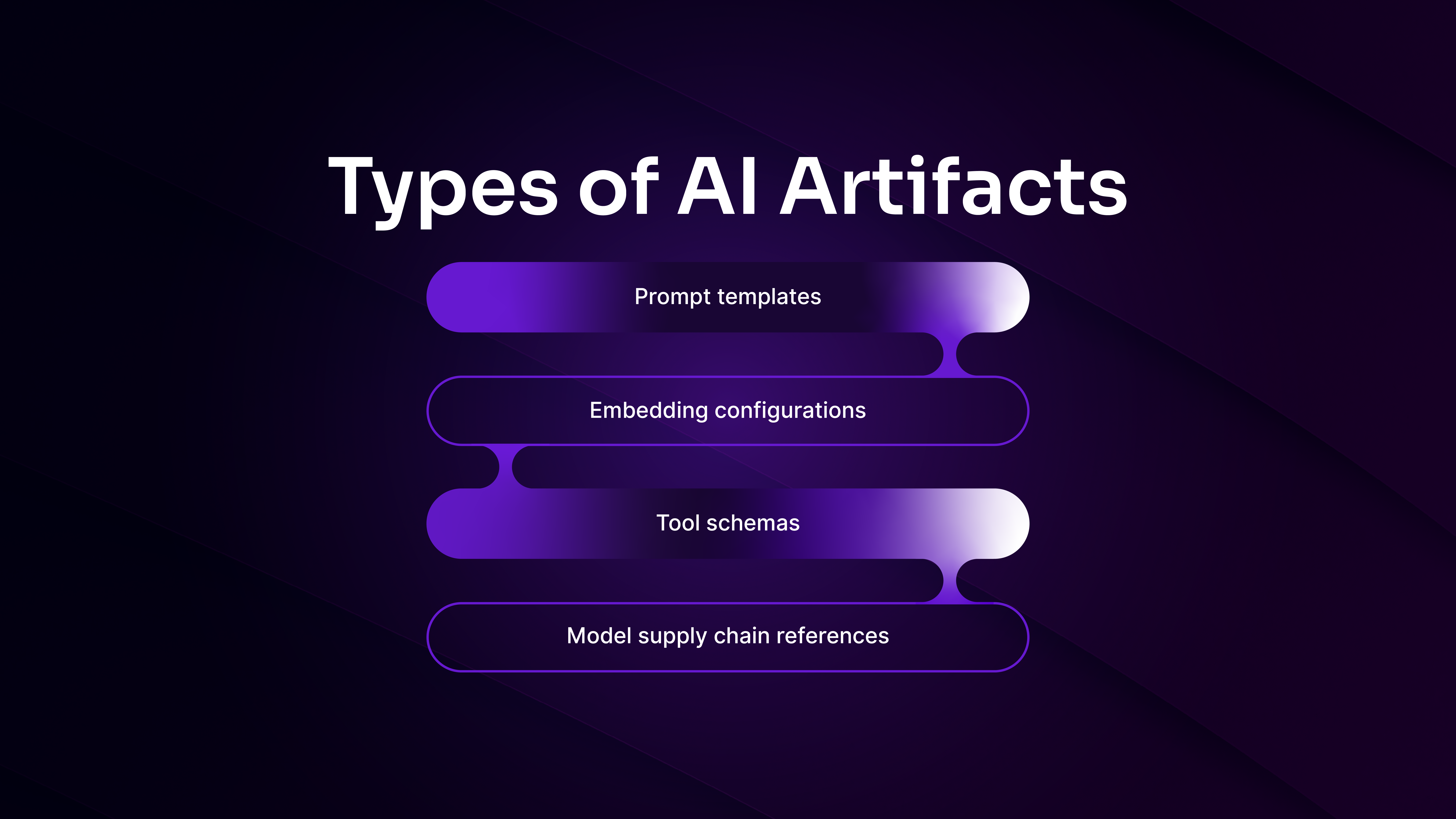
Dependency Files like requirements.txt:
offsec@kali:~$ cat support-assistant/requirements.txt
# Project Aurora - AI Customer Support Assistant
# Cloud-based architecture using Google Gemini API

# Core LLM SDK
google-generativeai>=0.8.0

# Agent Framework
crewai>=0.41.0

# Vector Database Client
pinecone-client>=3.0.0

# Google Cloud AI Platform (embeddings)
google-cloud-aiplatform>=1.38.0

# Data Validation
pydantic>=2.0

# Web Framework
fastapi>=0.109.0
uvicorn>=0.27.0
...

offsec@kali:~$ cat code-reviewer/requirements.txt
# Project Phoenix - AI Code Review Bot
# Self-hosted architecture with GPU inference

# Inference Server
vllm>=0.6.0

# Agent Framework
pyautogen>=0.2.0

# Vector Database
pymilvus>=2.4.0

# Embeddings
sentence-transformers>=2.3.0

# Code-specific Embeddings
tree-sitter>=0.21.0
tree-sitter-python>=0.21.0
tree-sitter-javascript>=0.21.0
tree-sitter-go>=0.21.0

# Model Loading
huggingface-hub>=0.20.0
transformers>=4.38.0

# Quantization
autoawq>=0.2.0
...
google-generativeai (Gemini API), crewai (agent framework), and pinecone-client (managed vector database). These libraries act as client SDKs for external cloud services,
vllm (local inference server), pyautogen (agent framework), pymilvus (self-hosted vector database), and tree-sitter (AST parsing for code analysis). These dependencies operate entirely on local infrastructure, suggesting that both model inference and data storage are self-hosted.
Attack Surface:
- Cloud-based: API key exposure, request interception, third-party dependencies
- Self-hosted: Local service security, access controls, infrastructure hardening.
RAG Configuration
offsec@kali:~$ cat support-assistant/config/rag.yaml
# RAG Pipeline Configuration for Aurora Support Assistant
# Optimized for customer documentation search

chunking:
  strategy: "text"
  chunk_size: 512
  chunk_overlap: 100
  separator: "\n\n"

embeddings:
  provider: "google"
  model: "text-embedding-004"
  dimensions: 768
  batch_size: 100

retrieval:
  top_k: 5
  score_threshold: 0.75
  distance_metric: "cosine"
  rerank: false

vector_store:
  provider: "pinecone"
  environment: "${PINECONE_ENVIRONMENT}"
  index_name: "${PINECONE_INDEX_NAME}"
  namespace: "customer-docs"
  metric: "cosine"
  pod_type: "p1.x1"
...
Aurora uses standard text chunking (512 characters) with Google's text-embedding-004 model.
offsec@kali:~$ cat code-reviewer/config/rag.yaml
# RAG Pipeline Configuration for Phoenix Code Reviewer
# Optimized for code semantic search

chunking:
  strategy: "ast_aware"
  chunk_size: 1500
  chunk_overlap: 300
  languages:
    - python
    - javascript
    - typescript
    - go
    - java
    - rust

code_parsing:
  extract_functions: true
  extract_classes: true
  extract_imports: true
  include_docstrings: true
  include_comments: true
  preserve_structure: true

embeddings:
  provider: "huggingface"
  model: "Salesforce/codet5p-110m-embedding"
  dimensions: 256
  batch_size: 32
  device: "cuda:0"
  normalize: true

reranker:
  enabled: true
  model: "BAAI/bge-reranker-base"
  top_k_rerank: 20

retrieval:
  top_k: 10
  score_threshold: 0.65
  distance_metric: "IP"

vector_store:
  provider: "milvus"
  host: "${MILVUS_HOST}"
  port: "${MILVUS_PORT}"
  collection_name: "${MILVUS_COLLECTION}"
  index_type: "IVF_FLAT"
  index_params:
    nlist: 1024
  search_params:
    nprobe: 16
  consistency_level: "Eventually"
...
Phoenix uses AST-aware chunking (1500 characters) with a code-specific embedding model (codet5p-110m). The larger chunk size and code-aware strategy indicate that Phoenix processes source code, not documents.
Agent Tools
Reveal capabilities and framework choices
offsec@kali:~$ cat support-assistant/src/agents/tools.py
...
from crewai import tool

@tool
def knowledge_search(query: str, department: str) -> str:
    """
    Search customer documentation and knowledge base.
...

@tool
def ticket_lookup(ticket_id: str) -> dict:
    """
    Look up support ticket status and history.
...

@tool
def escalate_ticket(ticket_id: str, reason: str) -> str:
    """Escalate ticket to human agent (create only)"""
...
Handle customer support workflows.
offsec@kali:~$ cat code-reviewer/prompts/function_schemas.json
{
  "functions": [
    {
      "name": "search_codebase",
      "description": "Semantic search across indexed repositories",
      "parameters": {"query": "string", "language": "string", "max_results": "int"}
    },
    {
      "name": "post_review_comment",
      "description": "Post inline comment on merge request",
      "parameters": {"repo": "string", "mr_id": "int", "file_path": "string", ...}
    },
    {
      "name": "run_security_scan",
      "description": "Run SAST security scanner on code (read-only)",
      ...
    }
  ]
}
Enable code review
System Prompts and Guardrails
Define the AI's persona, capabilities, and restrictions
offsec@kali:~$ cat support-assistant/prompts/system.txt
You are Aurora, NovaTech's official customer support AI assistant.

## Your Role
You help customers with:
- Product questions and feature explanations
- Troubleshooting common issues
- Support ticket creation and status updates
...

## Restrictions - DO NOT:
- Promise features that are not yet released
- Discuss pricing, discounts, or negotiate contracts
- Share internal documentation or employee information
- Compare NovaTech products to competitors
- Discuss security vulnerabilities or ongoing incidents
...


offsec@kali:~$ cat support-assistant/config/safety.yaml
# Safety and Guardrails Configuration for Aurora

# Gemini API Safety Settings
gemini_safety_settings:
  HARM_CATEGORY_HARASSMENT: "BLOCK_MEDIUM_AND_ABOVE"
  HARM_CATEGORY_DANGEROUS_CONTENT: "BLOCK_MEDIUM_AND_ABOVE"
...
blocked_topics:
  - "competitor comparisons"
  - "internal roadmap"
  - "security vulnerabilities"
  - "acquisition plans"
...
Supply Chain
offsec@kali:~$ cat support-assistant/.env.example
# Google Gemini API
GOOGLE_API_KEY=your_google_api_key_here
GOOGLE_PROJECT_ID=novatech-prod
GOOGLE_REGION=us-central1

# Pinecone Vector Database
PINECONE_API_KEY=your_pinecone_api_key_here
PINECONE_ENVIRONMENT=gcp-starter
PINECONE_INDEX_NAME=aurora-prod

# Application Settings
LOG_LEVEL=INFO
MAX_CONVERSATION_TURNS=50
ENABLE_PII_DETECTION=true

# Slack Integration (for escalations)
SLACK_WEBHOOK_URL=https://hooks.slack.com/services/xxx/yyy/zzz
SLACK_CHANNEL=#support-escalations


......

offsec@kali:~$ cat code-reviewer/config/models.yaml
# Model Configuration for Phoenix Code Reviewer

inference_server:
  type: "vllm"
  host: "${VLLM_HOST}"
  port: "${VLLM_PORT}"
...
  gpu_memory_utilization: 0.92
  max_model_len: 32768
  tensor_parallel_size: 2
...

primary_model:
  source: "huggingface"
  model_id: "Qwen/Qwen2.5-Coder-32B-Instruct"
...
  quantization:
    enabled: true
    method: "AWQ"
    bits: 4
    group_size: 128
...
  recommended_gpu: "2x NVIDIA A100 80GB"
...
Active Reconnaissance